

How C# Code Executes: Inside the CLR, JIT, and Garbage Collector

Have you ever wondered what actually happens between pressing F5 and your program printing "Hello, World"? C# is a managed language, which means a runtime sits between your code and the CPU — compiling, optimizing, and cleaning up after it. Understanding that pipeline makes you a better engineer: you write faster code, allocate less, and debug performance issues with confidence.
In this guide we'll trace a C# program's whole journey — from source to native code — and look closely at the two pieces most developers find mysterious: the CLR and the garbage collector. Animated diagrams included.
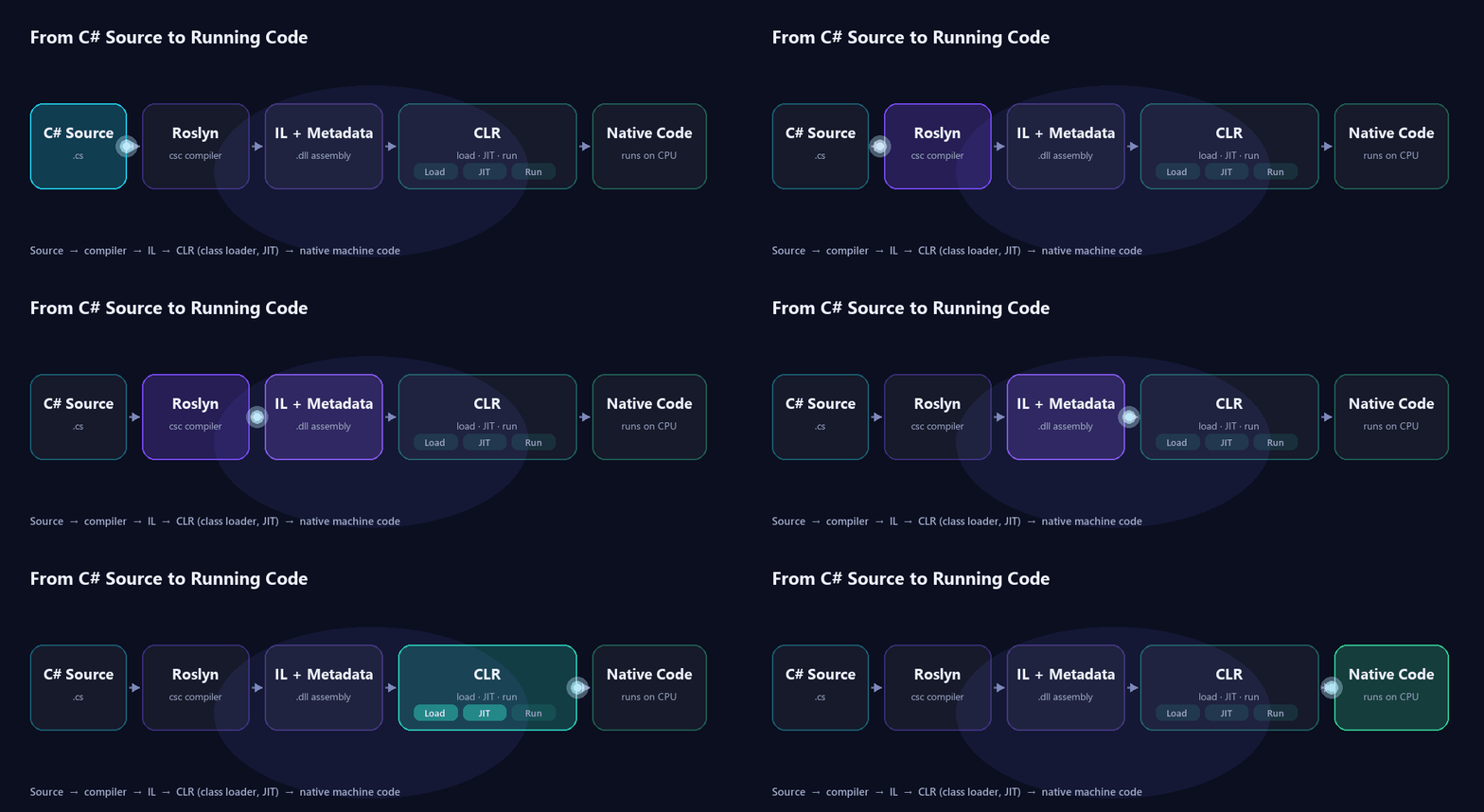
Step 1 — Compilation: C# Becomes IL
When you build a C# project, the Roslyn compiler (csc) doesn't produce machine code. Instead it produces Intermediate Language (IL, also called CIL or MSIL) plus metadata, packaged together in an assembly — a .dll or .exe.
IL is a CPU-independent instruction set. That's the secret behind .NET's portability: the same assembly can run on Windows, Linux, macOS, x64, or Arm, because the final translation to machine code happens later, on the target machine.
IL — platform-neutral instructions describing what your code does.
Metadata — describes every type, method, and field so the runtime can reason about your code.
Assembly — the
.dll/.exethat bundles IL and metadata together.
Step 2 — The CLR Takes Over
At runtime, the Common Language Runtime (CLR) loads your assembly and becomes the host for your code. The CLR is the engine of .NET, and it does far more than run instructions:
Class loading — locates and loads types on demand.
JIT compilation — turns IL into native machine code.
Memory management — allocates objects and runs the garbage collector.
Type safety, exceptions, security, and threading — the guarantees that make managed code safe.
Step 3 — JIT: Turning IL Into Native Code
The CLR never executes IL directly. The first time a method is called, the Just-In-Time (JIT) compiler translates that method's IL into native machine code for the current CPU, then caches it so subsequent calls run at full speed.
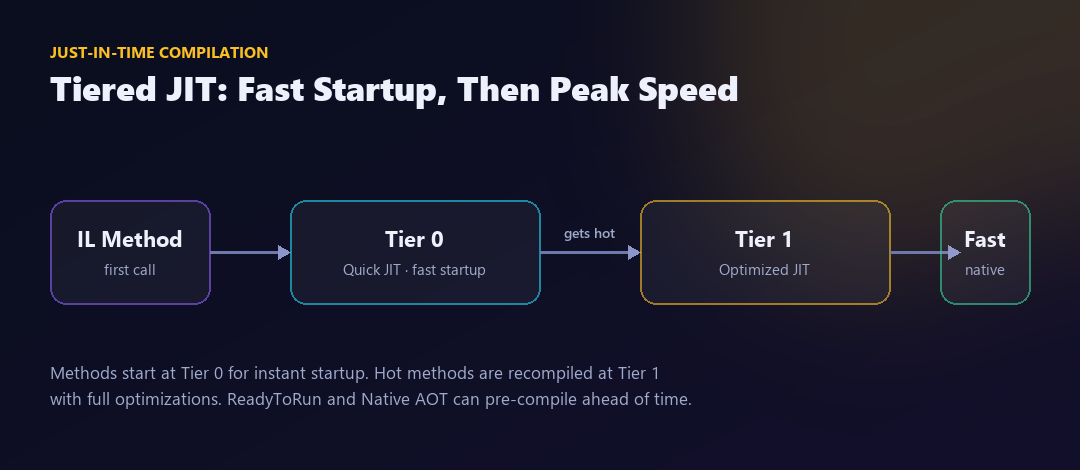
.NET uses tiered compilation to balance startup time and peak performance:
Tier 0 (Quick JIT) — compiles fast with minimal optimization, so apps start quickly.
Tier 1 (Optimized JIT) — once a method proves "hot" (called many times), it's recompiled with full optimizations.
For even faster startup, ReadyToRun (R2R) pre-compiles assemblies, and Native AOT compiles your whole app ahead of time into a single native binary with no JIT at runtime.
Where Your Data Lives: Stack vs Heap
To understand the garbage collector, you first need to know where objects live. The CLR uses two memory regions:
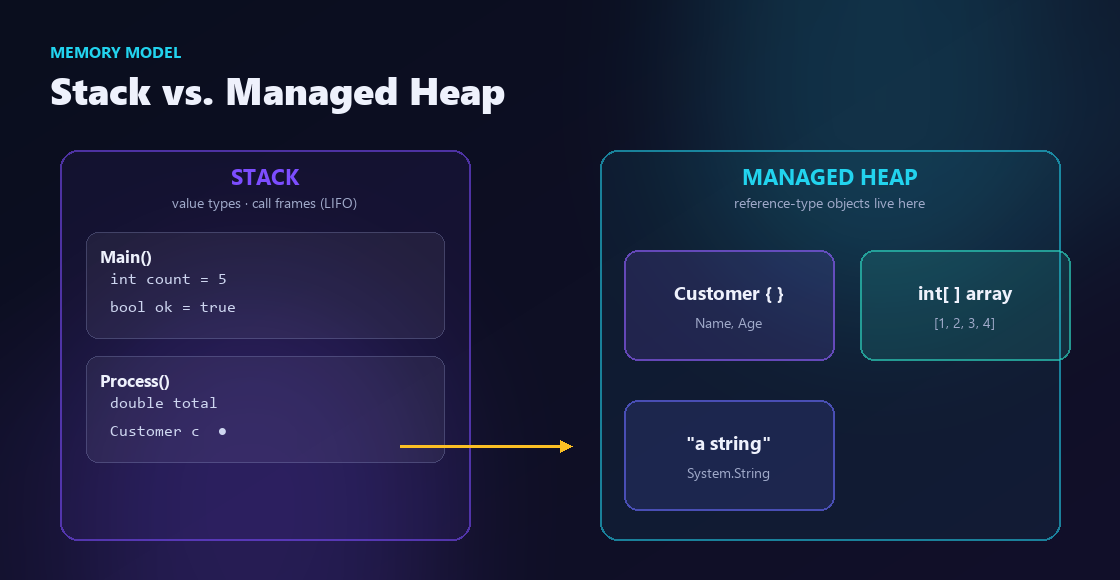
The stack — fast, automatically managed memory for method calls. It holds value types (
int,bool, structs) and references to heap objects. When a method returns, its frame is popped — no cleanup needed.The managed heap — where reference-type objects (classes, arrays, strings) live. This is the region the garbage collector manages.
Value types are copied by value and usually live on the stack; reference types live on the heap, and your variables hold a reference to them.
The Garbage Collector, Step by Step
C# doesn't make you free memory manually. The garbage collector (GC) automatically reclaims objects on the managed heap that your program can no longer reach. Here's how a collection actually works:

Allocation — new objects are placed in Gen 0, the nursery for short-lived objects.
Trigger — when Gen 0 fills up, the GC runs.
Mark — starting from roots (local variables, static fields, CPU registers, GC handles), the GC traces every object that is still reachable.
Sweep & compact — unreachable objects are reclaimed, and survivors are compacted together to avoid fragmentation.
Promote — objects that survive are promoted to the next generation.
Generations: Why the GC Is Fast
The GC is generational because most objects die young. Splitting the heap into generations lets it collect cheaply most of the time:
Gen 0 — newly allocated, short-lived objects. Collected often and very quickly.
Gen 1 — a buffer between short- and long-lived objects.
Gen 2 — long-lived objects (caches, singletons, static data). Collected rarely, because Gen 2 collections are the most expensive.
Large Object Heap (LOH) — objects of about 85 KB or larger are stored separately and collected with Gen 2.
Because the vast majority of collections only touch Gen 0, the GC stays fast even in large applications.
Workstation, Server & Background GC
The runtime offers GC modes tuned for different workloads — Workstation GC for client apps, Server GC for high-throughput servers (a heap and GC thread per core), and Background GC, which collects Gen 2 concurrently to minimize pauses.
Writing GC-Friendly C#
You rarely need to fight the GC, but a few habits keep your apps fast and your pauses short:
Allocate less in hot paths — fewer allocations means fewer collections.
Prefer structs for small, short-lived data to keep it on the stack and off the heap.
Reuse buffers with array pooling (
ArrayPool<T>) instead of allocating repeatedly.Use
Span<T>andMemory<T>to work with data without copying or allocating.Watch out for boxing — converting a value type to
objectallocates on the heap.Avoid large, frequent allocations that push objects onto the LOH.
Putting It All Together
Every time your C# program runs, this pipeline plays out: Roslyn compiles your code to IL, the CLR loads it, the JIT turns hot methods into optimized native code, your objects live on the stack and managed heap, and the garbage collector quietly reclaims what you no longer use. None of it requires manual memory management — but understanding it lets you write software that's both correct and fast.
At CodeChoicez, we build high-performance .NET systems where this kind of runtime understanding turns directly into faster, more reliable products. If you're building something ambitious on .NET, let's talk.